Showing posts with label CSS. Show all posts

Monday, April 10, 2017

CSS - Working with Text 2


Color
The CSS color property specifies the color of the text.
One method of specifying the color of the text is using a color name: like red, green, blue, etc. 
Here's an example of changing the color of your font.
 
The HTML:

The CSS:

Result:


Aligning Text Horizontally
The text-align property specifies the horizontal alignment of text in an element. By default, text on your website is aligned to the left. However, at times you may require a different alignment. 

text-align property values are as follows: leftrightcenter, and justify

THE HTML:

THE CSS:

Result:

Aligning Text Vertically 
The vertical-align property sets an element's vertical alignment. Commonly used values are topmiddle, and bottom.

The example below shows how to vertically align the text between the table. 

The HTML:

The CSS:

Result:

Text-decoration
The text-decoration property specifies how the text will be decorated. 

Commonly used values are:
none - The default value, this defines a normal text
inherit - Inherits this property from its parent element
overline - Draws a horizontal line above the text
underline - Draws a horizontal line below the text
line-through - draws a horizontal line through the text (substitutes the HTML <s> tag)
The HTML:
The CSS:
Result:

Indenting the Text
The text-indent property specifies how much horizontal space should be left before the beginning of the first line of the text. Property values are length (px, pt, cm, em, etc.), %, and inherit

The HTML:

The CSS:
Result:

Text-shadow
The text-shadow property adds shadow to text. 
It takes four values: the first value defines the distance of the shadow in the x (horizontal) direction, the second value sets the distance in the y (vertical) direction, the third value defines the blur of the shadow, and the fourth value sets the color

The HTML:
The CSS:

Result:

Text-transform
The text-transform CSS property specifies how to capitalize an element's text. For example, it can be used to make text appear with each word capitalized.
The HTML:

The CSS:

Result:

letter-spacing

The letter-spacing property specifies the space between characters in a text. The values can be set as:
normal defines the default style with no extra space between characters
length defines an extra space between characters using measurement units like px, pt, cm, mm, etc.;
inherit inherits the property from its parent element;moch
The HTML:
The CSS:
Result:

word-spacing
The word-spacing property specifies the space between words in a text. Just like the letter-spacing property, you can set the word-spacing values as normallength, and inherit
The HTML:
The CSS:
Result:

white-spacing
The white-space property specifies how white-space inside an element is handled. The values can be set as normalinheritnowrap, etc. 
The HTML:
The CSS:
Result:

The nowrap value suppresses all line breaks in the element. 

Saturday, April 8, 2017

CSS - Positioning and Layout

CSS - Positioning and Layout

The Display Property
Every element on a web page is a rectangular box.The display property determines how that rectangular box behaves. A block element is an element that takes up the fullest width available, with line breaks before and after.
The style rules in the following example display the inline <span> elements as block-level elements:
The HTML:

The CSS:

Result:

The Visibility Property
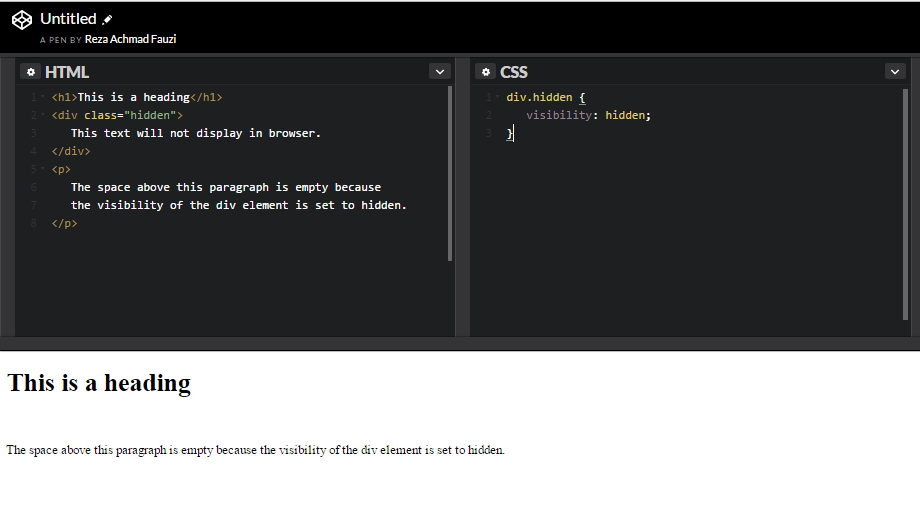
The visibility property specifies whether an element is visible or hidden. The most common values are visible and hidden

Hiding an element can be done by setting the display property to "none" or the visibility property to "hidden". However, notice that these two methods produce different results:
visibility:hidden hides an element, but it will still take up the same space as before. The element will be hidden, but it will still affect the layout:
Here is an example:
The HTML:

The CSS:

Result:

Positioning Element
The CSS positioning properties allow you to position an element. It can also place an element behind another, and specify what should happen when an element's content is too big.
Elements can be positioned using the top, bottom, left, and right properties. However, these properties will not work unless the position property is set first. They also work differently depending on the positioning method.
Static Positioning
HTML elements are positioned static by default. A static positioned element is always positioned according to the normal flow of the page.
The HTML:

The CSS:

Result:

Floating
With CSS float, an element can be pushed to the left or right, allowing other elements to wrap around it. Float is often used with images, but it is also useful when working with layouts.
The values for the float property are leftright, and none
Left and right float elements in those directions, respectively. none (the default) ensures that the element will not float. 
Below is an example of an image that is floated to the right. 
The HTML:

The CSS:

Result

The clear Property
Elements that come after the floating element will flow around it. To avoid this, use the clear property. The clear property specifies the sides of an element where other floating elements are not allowed to be. In the example below, if we set the float property to the div, only the paragraph that comes after the div will be wrapped around the image.
The HTML:

The CSS:

Result:

The overflow Property
As discussed earlier, every element on the page is a box. If the height of the box is not set, the height of that box will grow as large as necessary to accommodate the content. 
The HTML:

The CSS:

Result:
The Z-Index Property
When elements are positioned outside the normal flow, they can overlap other elements.
The z-index property specifies the stack order of an element (which element should be placed in front of, or behind, the others).
The CSS:

Result:


Monday, April 3, 2017

CSS: Working with Text 1

edankeun.com you must know 

The font-family Property


The font-family property specifies the font for an element. 
There are two types of font family names: 
font family: a specific font family (like Times New Roman or Arial)
generic family: a group of font families with a similar look (like Serif or Monospace)

Here is an example of different font styles:
Generic family 
Serif
Sans-Serif
Monospace

Font family
Times New Roman
Arial Verdana
Courier New

The HTML:


The CSS:


Result:
If the name of  a font family is more than one word, it must be in qoutation marks: "Times New Roman".
Why is the name of one of the fonts put in quotes, for consists of two 


Font-Size
The font-size Property sts the size of a font. one way to set the size of font. One way to set the size of fonts on the web is to use keywords. for example xx-small, small, medium, large, larger, largest etc.
THE HTML:


THE CSS:


Result:

Font-Style

The Html


The CSS:


Font-Weight
The font-weight controls the boldness or thickness of the text. The values can be set as normal (default size), boldbolder, and lighter.


The HTML:


The CSS:
Result:


Font-variant
The CSS font-variant property allows you to convert your font to all small caps. The values can be set as normalsmall-caps, and inherit


The HTML:
The CSS:
Result:

Friday, March 31, 2017

CSS Rules and Selectors

Hello world 
welcome back to edankeun.com

Now we going to CSS Syntax CSS is composed of style rules that the browser interprets and then applies to the corresponding elements in your document.
A style rule has three parts: selector, property, and value.
For example, the headline color can be defined as: h1 { color: blue; }Type Selectors The most common and easy to understand selectors are type selectors.
This selector targets element types on the page. For example, to target all the paragraphs on the page: p { color: red; font-size:130%; } id and class Selectors id selectors allow you to style an HTML element that has an id attribute, regardless of their position in the document tree. Here is an example of an id selector: The HTML:
This paragraph is in the intro section.
This paragraph is not in the intro section.
The CSS: #intro { color: white; background-color: gray; } lass selectors work in a similar way. The major difference is that IDs can only be applied once per page, while classes can be used as many times on a page as needed. In the example below, both paragraphs having the class "first" will be affected by the CSS: The HTML:
This is a paragraph
This is the second paragraph.
This is not in the intro section
The second paragraph is not in the intro section.
The CSS: .first {font-size: 200%;} Descendant Selectors These selectors are used to select elements that are descendants of another element. When selecting levels, you can select as many levels deep as you need to. For example, to target only elements in the first paragraph of the "intro" section: The HTML:
This is a paragraph.
This is the second paragraph.
This is not in the intro section.
The second paragraph is not in the intro section.
The CSS: #intro .first em { color: pink; background-color:gray; } i think just this our material thanks for your attention see you next time

Thursday, March 30, 2017

LEARN CSS Fundamental

Hello
Welcome back edankeun.com
oke to the point, I will learn and explain, how CSS learn;
before learn css you must understand about html work on web.
after that you can learn CSS very well.
you know css, css can make web to be simple easy


CSS standard for Cascading Style Sheets.
CSS two means:
-Cascading refer to way CSS applies one style on top of another
-Style Sheets control the look and feel of web documents
HTML and CSS work hand in hand:
-HTML is essential for any web professional. Acquiring this skill should be the starting point for anyone who is learning how to create content for the web.
web can be good if html and css work, not just html and not just css but together.

-CSS defines how HTML elements are displayed.
CSS used for to control the look and fell of web documents. CSS allows you to apply specific style to specific HTML elements.
CSS allows for for the sparation of style and content
CSS make HTML to be wonderful because css make style on web.

Inline CSS
using an inline style is one of the ways to insert a style sheet.

In order to use an inline style, add the style attribute to the relevant tag

The Example below shows how to create paragraph with a gray background and white text:


//

Embedded/Internal CSS


Internal styles are defined within the <style> element, inside the head section of an HTML page. 

For example, the following code styles all paragraphs:


All paragraphs have a white font and a gray background:
External CSS


With this method, all styling rules are contained in a single text file, which is saved with the .css extension. 

This CSS file is then referenced in the HTML using the <link> tag. The <link> element goes inside the head section.

Here is an example:
The HTML:

The CSS:


I think just this our learn on css, please learn css more
better late than never. try, try and try
see you next time.

thanks for you attention.